Agents in this workspace
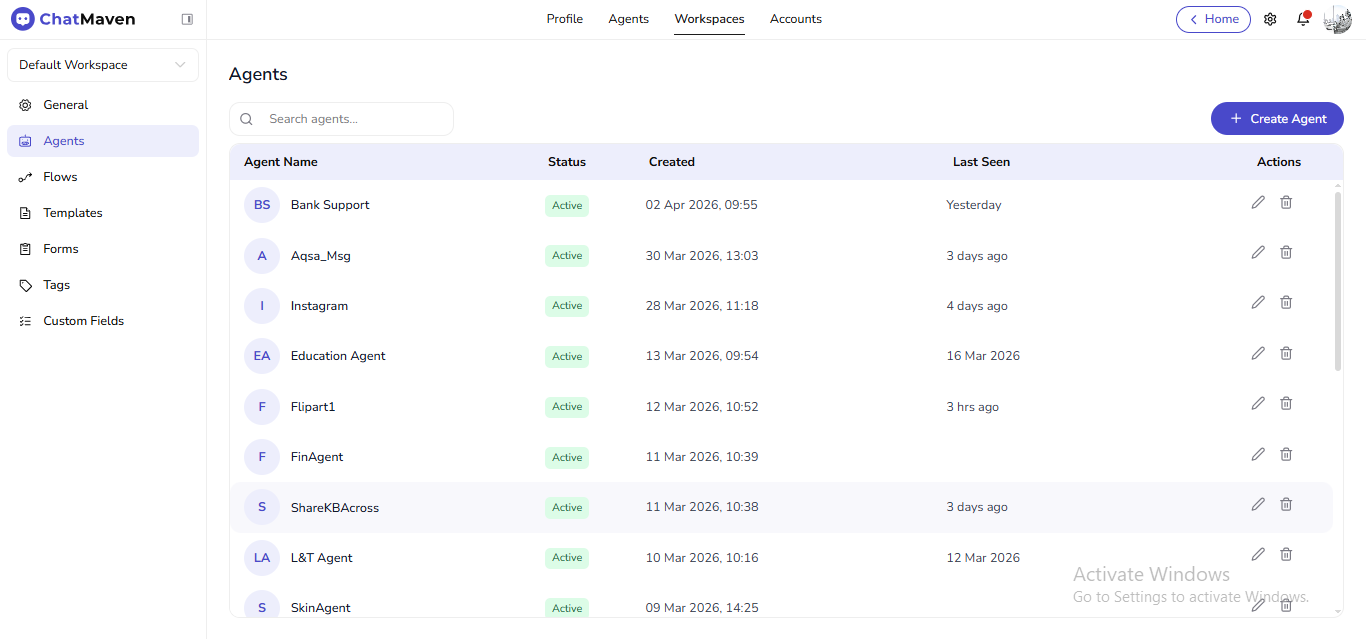
Under Workspaces in the top bar, Agents in the left sidebar is the workspace agent directory: every AI agent that belongs to the current workspace, with Search agents…, Create Agent, and per-row edit/delete.
Live URL: live.chatmaven.ai/workspaces/agents
This is different from the top-level Agents tab, which is the main place for the creation wizard, AI Settings, knowledge base, integrations, web chat, preferences, and live chats. Use Getting Started with AI Agents for that path.
Getting here
- Top bar: Workspaces.
- Sidebar: Agents.
What you see
- Search agents… — Filter the grid.
- Create Agent — Adds an agent to this workspace (you may continue into the same setup flow as elsewhere).
- Table columns typically include Agent Name, Status, Created, Last Seen, and Actions (edit, delete).
When to use which Agents entry
| Goal | Where to go |
|---|---|
| List agents for the workspace only | Workspaces → sidebar Agents |
| Run the full agent wizard, model, KB, integrations | Top Agents → Creating an AI agent and related guides |