Publish to Instagram
Publish to Instagram lets you post an image or Reel to your connected Instagram account from ChatMaven. The publish card sits on the Instagram Overview tab, alongside comment auto-reply and insights.
Instagram must be connected so Configure shows Connected and the Instagram toggle is enabled. Publishing does not change DMs, comments, or insights.
Open Publish to Instagram
- Go to Agents → Integrations.
- On the Instagram card, click Configure.
- Stay on the Overview tab.
- Scroll to Publish to Instagram (below insights).
The left rail should show Connected and your Instagram username. The publish card includes media type, caption, file upload, and the publish button.
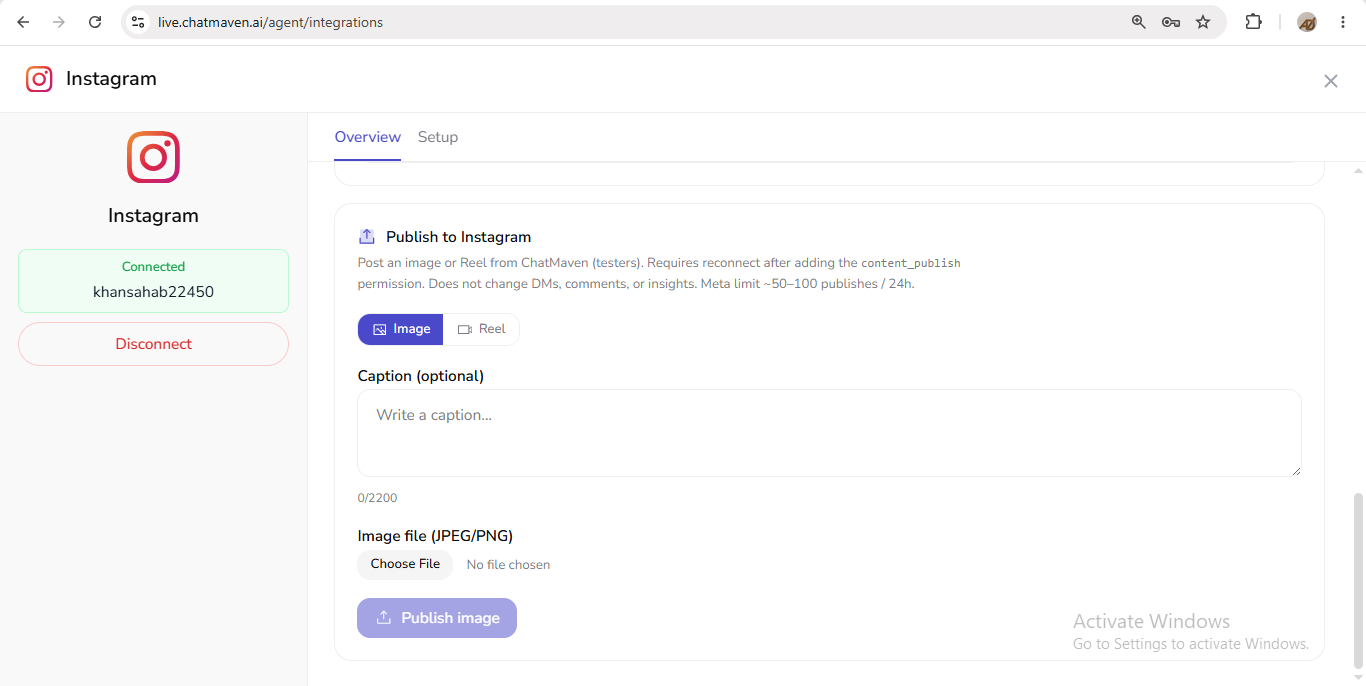
Use this card when you want to publish from ChatMaven without opening Instagram’s own create flow.
What the product says
Verbatim notice under Publish to Instagram:
Post an image or Reel from ChatMaven (testers). Requires reconnect after adding the content_publish permission. Does not change DMs, comments, or insights. Meta limit ~50–100 publishes / 24h.
Publish is labeled (testers) in the product. If you recently added the content_publish permission, reconnect Instagram before publishing.
How to publish
Choose Image or Reel
Select Image or Reel on the publish card. The selected option is highlighted.
Caption (optional)
Use Caption (optional) with placeholder Write a caption…. The character counter shows usage against 2200 (for example 0 /2200).
Upload the file
- For Image, the field is labeled Image file (JPEG/PNG).
- Click Choose File, pick your media, then click Publish image (button label when Image is selected).
If Reel is selected, follow the same pattern with the Reel file type shown in the UI for that mode.
What publish does not affect
As stated in the product notice, publishing from ChatMaven does not change DMs, comments, or insights. Those features continue to work independently of whether you publish from this card.
Limits
- Meta limit noted in product: ~50–100 publishes / 24h.
- Caption limit shown in UI: 2200 characters.
FAQ
Is publish on the Setup tab?
No. Publish to Instagram is on the Overview tab alongside insights and comment auto-reply. Setup is for connection management (for example Disconnect).
Why is Publish image disabled?
The button stays disabled until a valid file is chosen (and the channel remains connected with publish permission available).